Adding to our guest posts SEO Tips and Creating Cool Shirt Designs, we now bring you WordPress. Our newest guest writer Patrick will show you how to add your design to a WordPress blog. And that’s without using iFrames. It gets a little technical, but it can really be worth your time.
Many of you are already using WordPress to run your shop on an external website or simply to advertise and link to your shop. There isn’t yet a way to completely embed your shop in WordPress. There are a couple of ideas in the Forums and there was even a plugin available at some point. If you want to see how that kind of integration looks, check out Sheepshirts or Katelein, there’s already a WordPress installation running in the background.
Some also use the RSS feed from their Spreadshirt shop to dynamically embed products. That’s actually not that far from what the new Spreadshirt Rest API does – both deliver XML data. This can be read with PHP or other programming languages.
I first want to show you a little example how you can dynamically embed your newest design in a WordPress blog. I am working with the standard theme from WordPress 3, namely the TwentyTen theme.
Next add a template and create a PHP file with any name you like in your theme folder. I’ll call my file design-listing.php. Write at the top of this file:
<?php

/*

Template Name: list-shop-designs

*/

?>
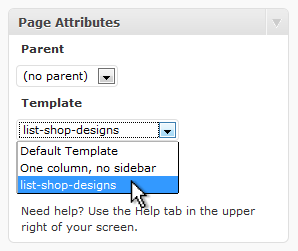
When you create a new page in your admin area, you can choose the template “list-shop-designs” on the right side. That means that each time the page is called up, the file design-listing.php is used.
In order for the page to fit the overall look of your blog, you’ll have to add some basic HTML. In TwentyTen, it looks like this:
<?php
 /*
 Template Name: list-shop-designs
 */
 ?>
 <? get_header(); ?>
 <div id="container">
 <div id="content" role="main">
...
 </div><!-- #content -->
 </div><!-- #container -->
 <?php get_sidebar(); ?>
 <?php get_footer(); ?>
Now all we have to do is replace those three dots with your designs. In order to make your life a little easier, I’m offering you a PHP class that simplifies the API a bit. Download the file spreadshirt-api.class.php and add it to the TwentyTen theme directory.
Now the file will be added and the ShopID saved (unfortunately, only ShopIDs from designer shops will work).
get_template_part( 'spreadshirt-api.class' );
$shopid = '605588';
Now the API class will go to work. We will create an instance for the class and will call up the design data.
$api = new SPREADSHIRT_API;
$xml = $api->get('shops/'.$shopid.'/designs',array('limit'=>200,'offset'=>0));
If you want to see what exactly is being called up, then click on the following link:
The script does nothing more than bring up this page and bring it into a format which we can easily get at. The XML data on this page have a simple tree structure which is found in the variables $xml. The variables represent the nodes. If we want to access values like the name, which can be found between the closed node <name>Designname</name>, then we would write $xml->name. If we want to access the attribute <designs count=”12″>, we would write $xml->attributes()->count.
Using a forreach loop, PHP can run multiple nodes and each node will be temporarily saved in a new variable.
foreach($xml as $design):
 ?>
 <a href="https://<?=$shopid?>.spreadshirt.net/-T6I<?=$design->attributes()->id?>" style="margin:10px;">
 <img src="<?=$api -> image ($design -> resources ->resource[0] -> attributes('xlink',true) -> href ,  array('width'=>'150','height'=>'150'))?>"/>
 </a>
 <?
 endforeach;
This loop will produce up to 200 of your designs and links to your Spreadshirt shop. You can see here what that looks like. Once again, the whole script together.
<?php
/*
Template Name: list-shop-designs
*/
get_header(); ?>
<div id="container">
<div id="content" role="main">
<?
get_template_part( 'spreadshirt-api.class' );
$shopid = '605588';
$api = new SPREADSHIRT_API;
$xml = $api->get('shops/'.$shopid.'/designs',array('limit'=>200,'offset'=>0));
foreach($xml as $design):
?>
<a href="https://<?=$shopid?>.spreadshirt.net/-T6I<?=$design->attributes()->id?>" style="margin:10px;">
<img src="<?=$api -> image ($design -> resources ->resource[0] -> attributes('xlink',true) -> href , array('width'=>'150','height'=>'150'))?>"/>
</a>
<?
endforeach;
?>
</div><!-- #content -->
</div><!-- #container -->
<?php get_sidebar(); ?>
<?php get_footer(); ?>
This is of course a very simple example. But, I’m sure that some ideas are already jumping in your head with everything that is possible with the API. Give it a try!
—
Patrick a.k.a. Great Graphics is a graphics and web designer from Leipzig.